


Chores & Allowance Bot
4.5708.00 Reviews
App Specs
- Version
- 4.9.91
- Updated On
- License
- Free
- Downloads
- 100,000+
- Developer
- Wingboat.com LLC
- Categories
- Parenting
- Platform
- Android
Screenshots
 Analysis by AppCompare
If you’ve ever tried to manage household chores or allowances for your kids, you know how chaotic it can get. Enters the Chores & Allowance Bot, your new household hero. I decided to give this app a whirl to see if it could really bring some order to the weekly chaos and make chore management as seamless as it promises.
Who benefits most from a shared routine?
I’d look at this as a practical fit for families who want chores and allowance to follow one visible routine rather than live in a parent’s memory, a paper chart, and a series of reminders shouted across the house. It is especially suited to parents who want children to connect a completed responsibility with a reward, while still keeping the parent in charge of what counts and how the system works.
A realistic use case is a busy school week: one child has a regular pet-feeding task, another is expected to help set the table, and weekend chores need a different rhythm. Rather than renegotiating the same expectations every morning, a parent can use recurring assignments for the steady jobs and make the occasional change when the family schedule shifts. That division matters: automate what is genuinely routine, but keep one-off or disputed jobs flexible so the app does not turn into a second source of arguments.
The app is less compelling if your household only has a couple of chores and everyone already agrees on them. A fridge chart or a shared family calendar may be quicker in that case, especially if you do not want to track rewards or allowance. It is also not a substitute for a conversation about fairness. A tracker can make expectations clearer, but it cannot decide whether one child’s workload is appropriate or whether a task needs adult supervision.
Where it sits beside familiar alternatives
Compared with a paper chore chart, this approach can keep allowance and savings in the same family routine instead of asking parents to maintain a separate record. Paper still has an advantage when children need a glanceable reminder in the kitchen or when a screen-free household is the priority. A general calendar can handle dates and reminders, but it usually takes more manual interpretation to connect a completed job with a reward. I would choose based on the family’s actual sticking point: remembering tasks, keeping reward records, or simply agreeing on who does what.
For families trying the app for the first time, I would keep the initial setup deliberately small. Add only the people who will use the system, choose a few repeatable chores, and agree in advance how completion is recognized. That gives children a fair chance to understand the routine before the list grows. It also helps parents spot whether the reward structure motivates their kids or whether the household would be better served by responsibilities that are not tied to money.
The Setup: Getting Started with Ease
First things first, setting up Chores & Allowance Bot was a breeze. The app is available on both Android and iOS, and downloading it took just a few moments. Once opened, the interface greeted me with a friendly and intuitive layout. I felt like I was chatting with an old friend who was eager to help keep my household running smoothly.
Worth Reading Before You Choose

EA SPORTS FC Mobile 26 Is a Bigger Football Game, but It Takes Time

Flipboard Shows What News Apps Must Do Beyond the Feed

Switching to Android Auto Means Rethinking Your Driving Routine

Google Calendar Makes a Crowded Week Easier to Manage

Ludo King Makes the Most of the Minutes Between Plans

Baby Panda World Brings Quick Play to Modern Phones, but Its Game Library Feels Busy
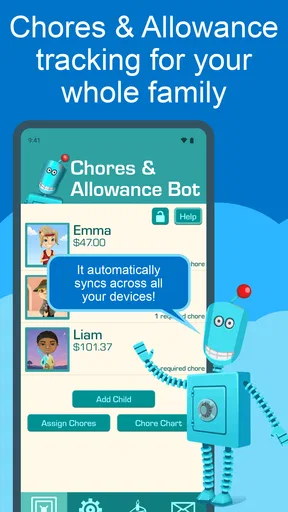
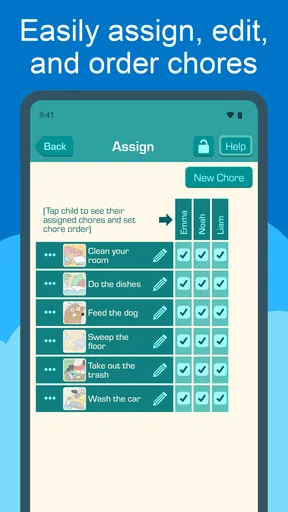
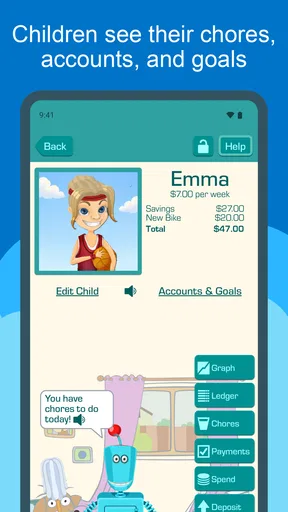
Adding family members was as simple as pie. You just enter their names, assign a cute avatar, and voilà! Everyone’s in the system and ready to start working on their tasks. I loved how you can customize the chores for each family member. Whether it’s taking out the trash or feeding the cat, each task is easy to assign with just a few taps.
Features that Shine
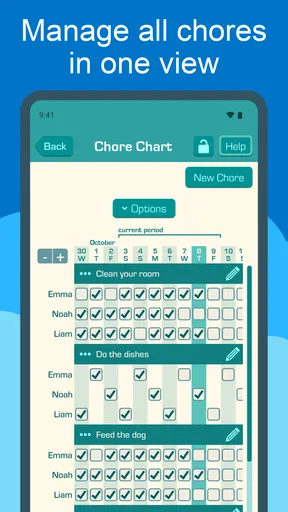
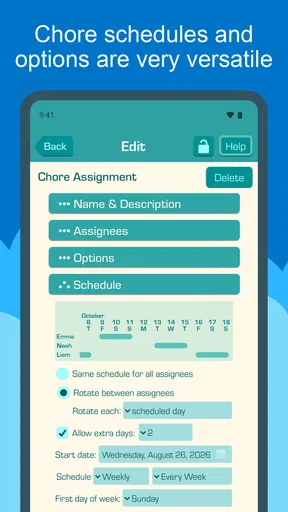
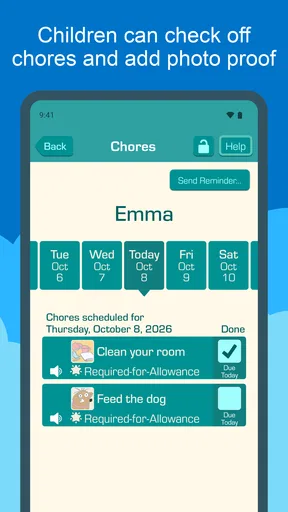
Here’s where the magic happens. The app allows you to set recurring chores, which means you can automate those daily tasks without having to remember them each day. I found this particularly useful for tasks like making the bed or setting the table, which need doing regularly.
My practical tip is to use recurrence for jobs whose timing is predictable, not for every responsibility in the house. A regular chore is easy for a child to recognize as part of a routine; an irregular job may need a quick explanation from a parent before it is assigned. Keeping the recurring list focused also makes it easier to notice whether an expectation has become unrealistic during a busy week, rather than treating an unchecked item as proof that someone has failed.
For shared tasks, I would agree on ownership before adding them. If two children both think the other is responsible for taking out the trash, a digital list cannot resolve that misunderstanding by itself. Assigning one person, or agreeing on a rotation that the family can explain plainly, makes the tracker more useful and reduces the chance that parents have to settle the same dispute repeatedly.
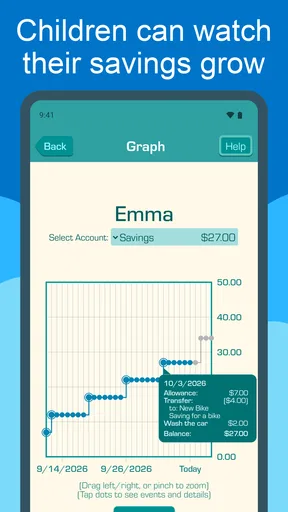
One feature that really caught my eye was the reward system. You can assign monetary rewards or points for each completed chore, and kids can see their progress in real-time. It’s like having a digital piggy bank, and trust me, it’s a game-changer. Suddenly, chores become a fun challenge rather than a dreaded obligation.
There is a useful trade-off here: rewards can make work feel concrete, but they can also lead children to see every household contribution as a paid transaction. I would use the system selectively and talk through which responsibilities are part of living together and which ones earn a reward. That small distinction helps preserve the app’s motivational side without making family cooperation depend entirely on a payout.
Allowances Made Simple
Managing allowances has never been simpler. The app provides a straightforward way to track allowances and expenditures, making financial literacy a family affair. Kids get to learn the value of saving and spending wisely, and parents have a clear overview of what’s going where. You can even link the app to a bank account for automatic transfers, ensuring the entire process is as hands-off as possible.
I would treat the tracking as a prompt for a short family conversation, not as a replacement for one. A child who sees a balance or progress record can practice deciding whether to spend now or wait, while a parent can explain the real-world choice behind that decision. If your family prefers cash in an envelope or a simple verbal allowance agreement, that may remain easier; the app is most helpful when everyone wants a shared record and is willing to keep it current.
Parents may also wonder whether setting it up commits them to automatic payments. The app’s allowance tools include a bank-linking option for automatic transfers, but that is a choice rather than the only way to think about allowances. Decide first whether your household wants a digital record, a transfer workflow, or both, and make sure children understand what the app’s progress represents. A displayed reward and money already transferred are not necessarily the same step in a family’s routine.
Intuitive Design and User Experience
The design of the app is both colorful and engaging, perfect for capturing the interest of young users. Navigation is smooth, with no lag or glitches, which is crucial when you’re trying to keep the momentum going in a busy household. I appreciated the attention to detail in the design, with everything laid out logically and accessibly.
For speed, the most meaningful test is not a benchmark but whether the app fits the short moments when a family actually uses it: checking a task before school, confirming a job after dinner, or reviewing allowance together. A chore tracker only saves effort if opening it and updating the routine feels simpler than the paper or verbal system it replaces. I would try those everyday actions with the whole family before migrating every household expectation into it.
Heavy-use moments can expose a different kind of friction from slow loading. If several people are checking tasks around the same time, the family still needs a clear habit for who marks work complete and who approves it. Agreeing that children check their own list and parents review it at a predictable time can prevent duplicate effort and reduce the temptation to debate every item at the moment it is due.
The app also sends reminders for upcoming chores, so there’s no excuse for forgetting. It’s like having a polite but firm personal assistant in your pocket, gently nudging you to stay on top of things.
Reminders work best when they support a routine rather than multiply into background noise. I would begin with the few prompts that solve a real problem, then adjust the family’s habits if reminders are being ignored. A notification can draw attention to a task, but it cannot make the timing reasonable or tell a child how to do a job correctly; those details are better settled together when the task is assigned.
Reliability, privacy, and device fit
When I think about reliability in a family tracker, I care as much about a routine that remains understandable as I do about the app’s interface. Parents should agree on a simple fallback if a child cannot check the app at the expected moment: the task can still be done, and the family can update its record later. That prevents a missed glance at a screen from becoming a missed chore or an unnecessary argument.
If an entry looks out of date or a device is unavailable, I would first check the shared routine with the family and confirm the task directly before changing rewards. That is a sensible recovery habit for any allowance tracker: do not make a money decision based solely on a moment of confusion. The app can organize the family’s record, but parents still need to use their judgment when a child says a job was completed and the record does not reflect it.
Families should also consider the devices their children can comfortably use. The current version is 4.9.91, and the minimum operating-system requirement is 9, so an older device may not be a suitable place to build the family’s routine. If a child does not have a compatible device, the parent can decide whether to manage the household system from an adult’s device or stick with a visible chart. The best setup is the one every family member can actually access without making screen ownership a new point of tension.
Chores & Allowance Bot is a free parenting app from Wingboat.com LLC. It has an Everyone age rating, a 4.5 average from around 2.7 thousand ratings, and over 100 thousand installs. It first appeared on September 5, 2016, and offers in-app purchases priced at $39.99 per item, so I would check the purchase details before committing to anything beyond the free starting point. The version and device requirements are worth checking before setting up a routine that children will rely on.
On performance, my verdict is that the app’s value depends less on demanding hardware than on a family’s willingness to keep its chore and reward habits clear. The interface is described as smooth in everyday use, but no household should assume a tracker removes every source of friction. I would start with a small routine, see whether reminders and progress records genuinely save time, and expand only if the family finds them useful.
Final Thoughts
Overall, Chores & Allowance Bot has transformed the way my family manages chores and allowances. It’s user-friendly, engaging, and packed with features that make household management not just easy but enjoyable. It’s not just an app; it’s a new way of bringing balance and responsibility into our home.
If you’re looking to bring some order to your household chaos, I’d definitely recommend giving Chores & Allowance Bot a try. It’s a small investment in time for a big payoff in peace of mind.
I would recommend it most to a family that wants chores, rewards, and allowance records to live in one shared routine, and that is ready to talk through expectations rather than simply post them. I would skip it if a paper chart already works, if children cannot reasonably access a compatible device, or if the family does not want rewards tied to household tasks. In those cases, a simpler chart or calendar is not a downgrade; it may be the clearest choice.
Pros
- Easy setup and user-friendly interface.
- Customizable chores and allowance settings.
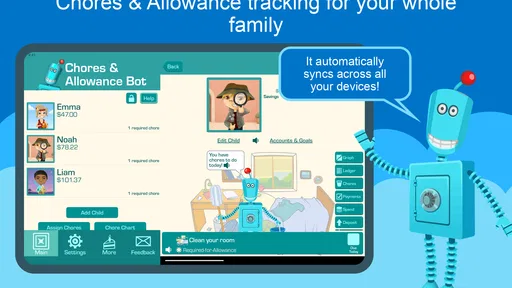
- Supports multiple children accounts.
- Real-time notifications keep parents informed.
- Engaging rewards system for kids.
Cons
- Limited free version features.
- Requires internet connection to sync.
- No integration with other financial apps.
- Ads can be intrusive at times.
- Lacks advanced parental control options.
FAQs for Chores & Allowance Bot
What is Chores & Allowance Bot, and how does it work?
Chores & Allowance Bot is an app designed to help families manage household chores and track allowances. It allows parents to assign tasks to their children and set up recurring tasks. The app tracks the completion of chores and calculates allowances, providing an easy and organized way to manage household responsibilities.
Is Chores & Allowance Bot suitable for all ages?
Yes, Chores & Allowance Bot is designed for families with children of various ages. The app features a user-friendly interface that allows even younger children to interact with it easily. Parents can customize tasks and allowances to suit the age and ability of each child, making it a versatile tool for any family.
Does Chores & Allowance Bot support multiple users?
Absolutely! Chores & Allowance Bot supports multiple profiles, enabling each family member to have their own account. This feature allows parents to assign specific chores and track allowances for each child individually, providing a personalized experience that ensures everyone’s tasks and rewards are managed separately.
Can I use Chores & Allowance Bot offline?
Chores & Allowance Bot requires an internet connection for certain features, such as syncing data across devices. However, many functionalities, like viewing assigned chores and marking them as complete, can be accessed offline. Once reconnected, the app will automatically sync any changes made during offline use.
How secure is my family's data on Chores & Allowance Bot?
The app prioritizes user privacy and data security. It uses encryption to protect users’ information and ensures compliance with data protection regulations. Additionally, Chores & Allowance Bot does not share personal data with third parties without consent, giving families peace of mind regarding their data’s safety.


